
Introduction to AWS: The Ultimate Beginner’s Guide
Last Updated: February 2026
Learn the cloud platform that powers Netflix, Facebook, and NASA.
Introduction: The Invisible Engine of the Internet
Have you ever wondered how Netflix streams movies to millions of people without crashing? How does Zomato track thousands of delivery partners in real-time? They don’t have a magical supercomputer in their office. They use AWS (Amazon Web Services).
If you are learning DevOps or Cloud Computing, AWS is not “optional”—it is mandatory. AWS owns 32% of the entire cloud market, making it the #1 cloud provider in the world.
In this guide, I will explain What AWS is, How its Infrastructure works, and the 5 Core Services every fresher must know.
1. What is AWS? (In Simple English)
AWS (Amazon Web Services) is a cloud platform that provides 200+ services over the internet. Instead of buying physical servers, hard disks, and databases, you rent them from Amazon on a “Pay-as-you-go” basis.
Think of AWS like a Utility (Electricity):
- You don’t build a power plant to turn on a light bulb.
- You just plug it in and pay for what you use.
- Similarly, with AWS, you just “plug in” to their servers and pay only for the time you use them.
2. The AWS Global Infrastructure (Interview Question)
This is the most important concept to understand. AWS is not just “in the cloud”; it exists in physical locations.
AWS divides the world into Regions and Availability Zones (AZs).
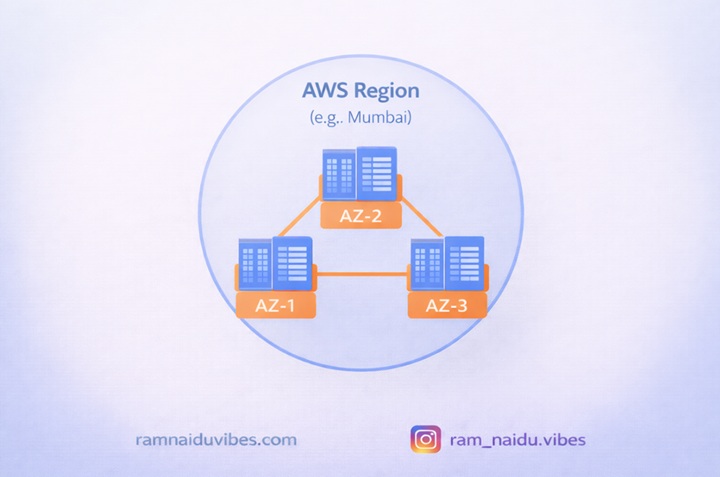
A. Regions (The Cities)
A Region is a specific geographic location where AWS has data centers.
- Examples: us-east-1 (N. Virginia), ap-south-1 (Mumbai).
- Rule: You always choose a Region closest to your customers to reduce delay (latency).
B. Availability Zones / AZs (The Buildings)
Inside every Region, there are 3 or more Availability Zones (AZs). An AZ is an actual Physical Data Center (a building full of servers) with its own power, cooling, and security.
The “City Analogy”:
- Region: Think of it as Hyderabad City.
- AZ 1: A building in Hitech City.
- AZ 2: A building in Gachibowli (10 km away).
- Why? If a fire happens in the Hitech City building (AZ 1), your application keeps running from the Gachibowli building (AZ 2). This is called High Availability.
3. Why Do Companies Choose AWS?
Why did Netflix move 100% of its data to AWS?
- Scalability: If millions of users log in on a Sunday, AWS automatically adds more servers. When they leave, it removes them.
- Cost-Effective: Zero upfront cost. You don’t need to invest ₹50 Lakhs in hardware. You can start with ₹0.
- Security: AWS security is better than most banks. They have military-grade protection for their data centers.
4. The "Big 5" Core Services (Must Know)
AWS has 200+ services, but as a beginner, you only need to master these 5 to get a job.
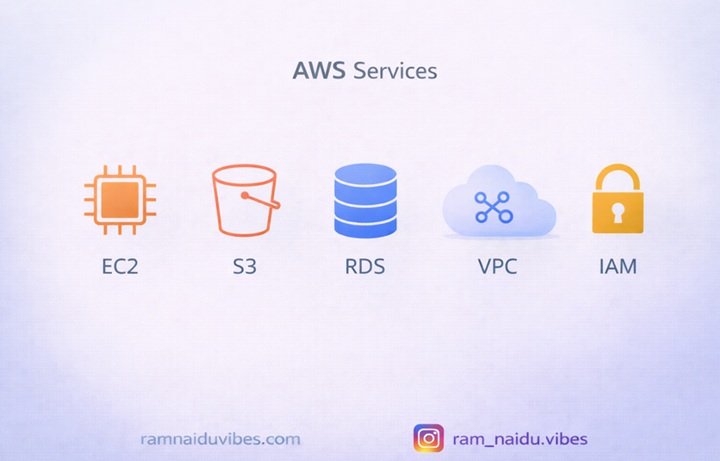
1. EC2 (Elastic Compute Cloud) – The “Virtual Laptop”
- What it is: A virtual server.
- Analogy: It’s like renting a laptop in the cloud. You can choose the OS (Linux/Windows), RAM (4GB/16GB), and CPU.
- Use Case: Running your website or Java application.
2. S3 (Simple Storage Service) – The “Unlimited Hard Disk”
- What it is: Object storage for files.
- Analogy: Like Google Drive, but for your code. You can store images, videos, and logs here.
- Use Case: Netflix stores all its movie files in S3.
3. RDS (Relational Database Service) – The “Managed Database”
- What it is: A database service that manages SQL, MySQL, or PostgreSQL for you.
- Analogy: Instead of installing MySQL and fixing updates yourself, AWS does it for you. You just store data.
- Use Case: Storing user login details and transaction records.
4. VPC (Virtual Private Cloud) – The “Private Network”
- What it is: A secure, isolated network for your servers.
- Analogy: Think of VPC as your Home WiFi Only people inside your house (Network) can talk to each other; outsiders are blocked.
- Use Case: Protecting your database from public hackers.
5. IAM (Identity and Access Management) – The “Security Guard”
- What it is: A service to manage users and permissions.
- Analogy: The ID Card system in an office. It decides Who can enter and What rooms they can access.
- Use Case: Creating a username for a developer and giving them permission only to access S3, not the Database.
5. The AWS Free Tier (Good News for Students!)
Amazon wants you to learn. That’s why they offer a Free Tier for 12 months for new accounts.
- EC2: 750 hours/month free (enough to run a server 24/7).
- S3: 5GB of storage free.
- RDS: 750 hours/month of database usage free.
Warning: Always set a Billing Alarm so you don’t accidentally cross the limits!
Conclusion: Your Cloud Journey Starts Here
AWS is vast, but you don’t need to learn everything at once. Start small:
- Create a Free AWS Account.
- Launch a simple EC2 Instance (Linux machine).
- Try to host a simple HTML page on it.
Once you do that, you are officially a Cloud Engineer in the making.