
Master Java Logic (Part 1): Operators & Conditional Statements Explained
[last_updated]
How to Make Your Code “Think” using If-Else, Switch, and Logic Tools.
Introduction: From Storage to Intelligence
In our previous blog, we learned how to store data using Variables like int and String.
But a program that just stores data is useless. It’s like a calculator that can’t add.
To build real applications—like an ATM that checks your PIN or a game that decides if you won—your code needs to make decisions.
- “If the password is correct, login.”
- “If the balance is low, show a warning.”
In this guide, we will master the Operators (the tools) and Conditional Statements (the brains) of Java.
1. Java Operators: The Toolkit
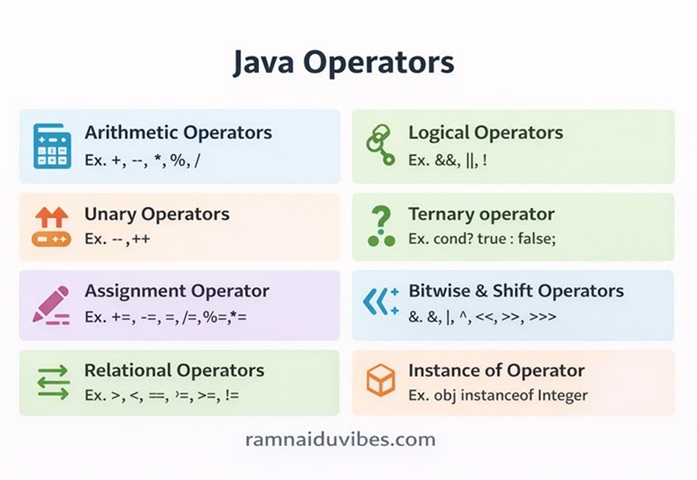
Before we make decisions, we need tools to compare things. Java has 7 main types of operators.
A. Arithmetic Operators (The Math)
Used for basic calculations: +, -, *, /.
- The Hero: Modulo (%)
- Most beginners ignore this, but it is the most important operator for logic.
- It gives you the Remainder.
- 10 % 3 = 1 (Because 3 goes into 10 three times, leaving 1).
- Use Case: Checking if a number is Even or Odd (num % 2 == 0).
B. Unary Operators (The Solo Players)
They work on a single variable.
- Increment (++): Increases value by 1 (a++ is the same as a = a + 1).
- Decrement (–): Decreases value by 1.
C. Relational Operators (The Comparators)
These always return a boolean answer: True or False.
- > (Greater than), < (Less than)
- >= (Greater/Equal), <= (Less/Equal)
- == (Equal to) → Note: Don’t confuse with = (Assignment)!
- != (Not Equal to)
D. Logical Operators (The Decision Makers)
Used to check multiple conditions together.
- && (AND): Both conditions must be True. (e.g., You need a Login ID AND Password).
- || (OR): At least one condition must be True. (e.g., Pay via Credit Card OR Cash).
- ! (NOT): Reverses the result. (True becomes False).
E. Assignment Operators (The Shortcuts)
- = (Simple Assign)
- += (Add and Assign). Example: a += 10 is the same as a = a + 10.
F. Bitwise Operators (The Deep Tech)
Used to manipulate bits (0s and 1s). Rarely used by beginners but vital for cryptography.
- &, |, ^, ~.
G. Ternary Operator (The One-Liner)
A shortcut for if-else.
- Syntax: Condition ? TruePart : FalsePart
- Example: int status = (age >= 18) ? “Adult” : “Minor”;
2. Conditional Statements: Making Decisions
Now that we have the tools, let’s use them to control the flow of the program.
A. Simple if Statement (The Gatekeeper)
This checks a condition. If it is true, you enter. If false, you simply skip it.
Real-Life Example: The Exam Hall
- Condition: Do you have a Hall Ticket?
- If True: You can enter and write the exam.
- If False: (Nothing happens, you just stay outside).
public class HallTicketCheck {
    public static void main(String[] args) {
        boolean hasHallTicket = true;

        if (hasHallTicket) {
            System.out.println("Allowed: You can write the exam.");
        }
    }
}
B. if-else Statement (The Two Roads)
Used when you have two clear choices. Do this OR do that.
Real-Life Example: The Movie Ticket
- Condition: Are you older than 18?
- If True: Watch the movie.
- Else: Go home.
Java
int age = 15;

if (age > 18) {
    System.out.println("Enjoy the movie!");
} else {
    System.out.println("Nope! You are too young.");
}
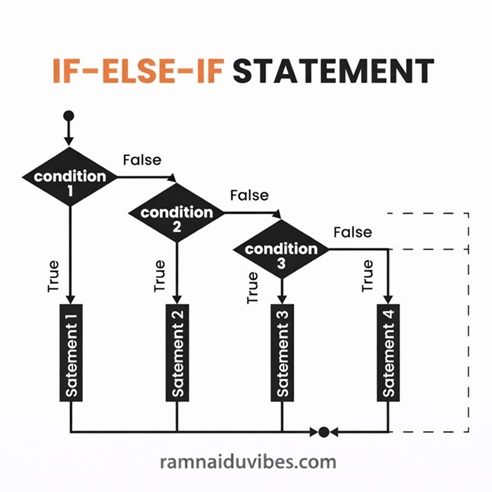
C. else-if Ladder (Multiple Choices)
Used when you have more than two options. The computer checks them one by one from the top.
Real-Life Example: The Traffic Light
- Red →
- Yellow → Wait.
- Green → Go.
Java
String signal = "Yellow";

if (signal == "Red") {
    System.out.println("Stop! Do not cross.");
}
else if (signal == "Yellow") {
    System.out.println("Wait... getting ready.");
}
else if (signal == "Green") {
    System.out.println("Go! Drive safe.");
}
else {
    System.out.println("Signal Malfunction!");
}
D. Nested if (Decisions Inside Decisions)
Sometimes, you need to check a second condition only if the first one is true. This is called Nesting.
Real-Life Example: Blood Donation
- Check 1: Are you 18+? (If No, stop immediately).
- Check 2: (Only if 18+) Is your weight > 50kg?
Java
int age = 20;
int weight = 48;

if (age >= 18) {
    // Inner Decision
    if (weight > 50) {
        System.out.println("Success! You can donate.");
    } else {
        System.out.println("Age is OK, but Weight is too low.");
    }
} else {
    System.out.println("You are too young to donate.");
}
3. The Switch Case (The Menu System)
You might ask: “Why do we need Switch if we have else-if?”
Imagine an ATM menu with 10 options. Writing 10 else-if blocks is messy and slow.
Switch is designed for scenarios where you have a fixed list of options (like days of the week or menu items).
Real-Life Example: Days of the Week
Java
int day = 4;

switch (day) {
    case 1: System.out.println("Monday"); break;
    case 2: System.out.println("Tuesday"); break;
    case 3: System.out.println("Wednesday"); break;
    case 4: System.out.println("Thursday"); break;
    case 5: System.out.println("Friday"); break;
    case 6: System.out.println("Saturday"); break;
    case 7: System.out.println("Sunday"); break;
    default: System.out.println("Invalid Day! Enter 1-7.");
}
Pro Tip: Always use break. If you forget it, the code “falls through” and executes all the cases below it!
4. Practice Challenges (Do This Now)
Logic is not learned by reading; it is learned by solving. Try writing code for these 3 problem statements.
- The “Odd or Even” Checker:
- Problem: Write a program that takes a number (e.g., 45) and prints if it is Even or Odd.
- Hint: Use the modulo operator (% 2).
- The Calculator:
- Problem: Create a program using switch that takes two numbers and an operator (+, -, *, /) and prints the result.
- The Leap Year Puzzle (Important!):
- Problem: Write a program to check if a year is a leap year.
- Rule: A year is a leap year if it is divisible by 4. However, if it is a century year (like 1900), it must be divisible by 400.
Conclusion: You Have the Brains
You now understand how to use Operators to calculate and If-Else/Switch to make decisions. Your code can “think.”
But currently, your code only runs once. What if you want to print “Hello” 100 times? Or process a list of 50 students? You don’t want to copy-paste code 50 times.
In Part 2, we will master Loops (For, While, Do-While)—the power of repetition.