
How Java Works: The History, Architecture & Data Types Explained
[last_updated]
: A Deep Dive into the Engine (JVM) and Memory of the World’s Most Popular Language.
Introduction: Beyond the "Hello World"
Most beginners write System.out.println(“Hello World”);, see the output, and move on. But have you ever wondered how the computer understood that text? How did English code turn into electricity inside the CPU?
In this deep-dive guide, we aren’t just writing code. We are looking under the hood of the car. We will explore the History of Java, the JVM Engine, and the Data Types that power every application from Minecraft to your Banking App.
1. A Coffee Break: The Story of Java
Before we look at the future, let’s respect the past.
The “Green Team” (1991): It started with a small team of engineers at Sun Microsystems, led by James Gosling. They wanted to create a language for digital devices like Cable TV boxes. The language was originally called “Oak” (after a tree outside Gosling’s office).
The Pivot (1995): The internet was booming. The team realized their language was perfect for the Web because it could run on any computer. They renamed it “Java” (named after the coffee they drank during brainstorming sessions) and released it in 1995.
The Philosophy: Their slogan changed the world: “Write Once, Run Anywhere” (WORA). This meant you could write code on a Windows PC, and it would run perfectly on a Mac, a Linux server, or even a washing machine, without changing a single line.
2. Why is Java Special? (Key Features)
Java isn’t just popular by luck. It was designed with specific goals:
- Simple: It removed the complex and dangerous memory features of C++ (like Pointers). If you make a mistake, Java stops you before you crash the system.
- Object-Oriented: Everything in Java is an “Object” (e.g., a User, a Button, a Car). This makes code easier to organize.
- Platform Independent: As mentioned, Java code runs on a “Virtual Machine,” not directly on the hardware.
- Secure: Java programs run inside a “Sandbox.” A bad website running Java cannot easily access your private files or webcam.
- Robust: Java has automatic Garbage Collection. It cleans up unused memory automatically, preventing your computer from freezing.
3. The Java Execution Process (How Code Runs)
This is the interview question that separates beginners from pros. How does Main.java become a running application?
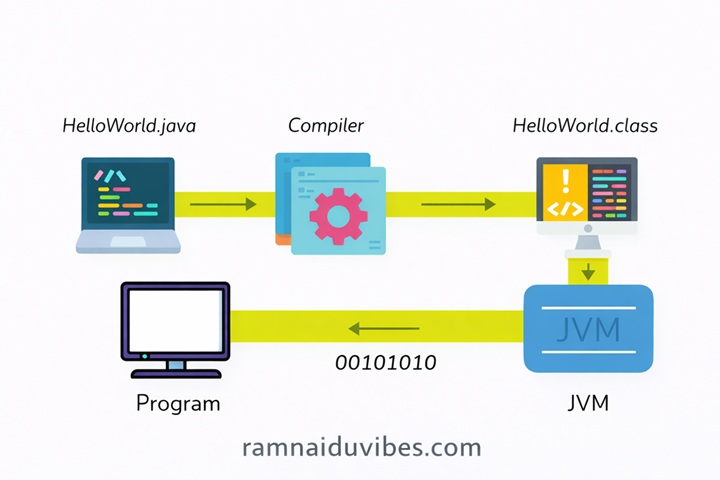
The 3-Step Flow:
- Source Code (.java): You write the code in English (High-Level Language).
- Compiler (javac): The compiler checks for errors. If it’s clean, it converts the code into Bytecode (.class file).
- Note: Bytecode is a secret language that only the JVM understands. It is NOT Machine Code yet.
- JVM (Execution): The Java Virtual Machine reads the Bytecode and translates it into Machine Code (0s and 1s) that your specific CPU (Intel/AMD/Apple) understands.
Deep Dive: Inside the JVM (The Engine)
Inside the JVM, two critical components execute your code:
- The Interpreter (The Reader): Reads Bytecode line-by-line and executes it. It’s simple but can be slow.
- The JIT Compiler (The Memorizer): Just-In-Time Compiler. It watches the Interpreter. If it sees a block of code running repeatedly (like a loop), it compiles that specific block into raw Machine Code and saves it. This makes Java run almost as fast as C++.
4. The Ecosystem: JDK, JRE, and JVM
Don’t memorize definitions. Visualize the workflow.
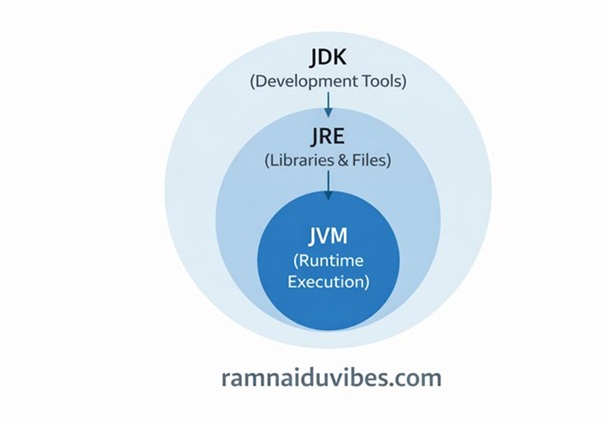
The Restaurant Analogy:
- JDK (Java Development Kit) = The Kitchen.
- It contains the tools to cook (write) code: The Compiler (javac) and Debuggers.
- JRE (Java Runtime Environment) = The Dining Hall.
- It contains the libraries and environment to serve (run) the code.
- JVM (Java Virtual Machine) = The Chef.
- This is the engine that actually does the work.
Deep Dive: Inside the JVM (The Engine)
The JVM is where the magic happens. Inside the JVM, there are two critical components that execute your code:
- The Interpreter (The Reader)
- How it works: It reads the Bytecode line-by-line and executes it immediately.
- Problem: It is slow. If you have a loop that runs 1,000 times, the Interpreter reads the same line 1,000 times!
- The JIT Compiler (The Memorizer)
- JIT = Just-In-Time Compiler.
- How it works: The JIT watches the Interpreter. If it sees a block of code running repeatedly (like a loop), it says, “Wait, I’ve seen this before!”
- It compiles that specific block into raw Machine Code and saves it.
- Next time, the JVM uses the saved Machine Code instantly instead of interpreting it again.
- Result: Java runs almost as fast as C++.
5. Your First Program: The Anatomy of "Hello World"
Before we learn data types, let’s write the most famous code in history.
public class HelloWorld {
    public static void main(String[] args) {
        System.out.println("Hello, Java!");
    }
}
If you run this, it prints Hello, Java! to the screen. But why so many keywords? Let’s dissect it like a biology frog.
- class HelloWorld
- What it is: In Java, everything lives inside a Class. You can’t write code floating in space.
- The Rule: The file name must match the class name exactly. If your class is HelloWorld, your file must be java.
- public
- What it is: An Access Modifier.
- Meaning: “Open to the World.” It means the JVM (the engine) can access this code from anywhere to run it. If you make it private, the JVM can’t see it, and your program won’t start.
- static
- What it is: A keyword that lets code run without creating an Object.
- The Analogy: Usually, to drive a car (Object), you first need to buy the car (create it). But static is like a Bus Stop. You don’t need to buy the bus stop to use it; it’s just there.
- Why here? The JVM wants to run your program before creating any objects. static allows that.
- void
- What it is: The Return Type.
- Meaning: “I will do the work, but I won’t give you anything back.”
- Why? The main method just runs the program. It doesn’t need to return a number or text to the JVM.
- main
- What it is: The Method Name.
- The Analogy: The Front Door.
- Why? When the JVM starts, it looks for the word main. No main, no entry, no program execution.
- String[] args
- What it is: The Parameters (Inputs).
- Meaning: It stands for “String Arguments.” It allows you to pass information to your program when you start it (from the command line). Most beginners don’t use this, but it must be there.
- System.out.println
- The Breakdown:
- System: A built-in class that lets you talk to your computer (Console).
- out: The specific “Output” connection.
- println: Stands for “Print Line.” It prints text and then moves the cursor to the next line.
6. Variables & Data Types: Primitives vs. Wrappers
In Java, data is stored in variables. But unlike Python or JavaScript, Java is Statically Typed. You must tell the computer exactly what kind of data you are storing.
A. Primitive Data Types (The “Paper Cups”)
These are basic containers. They store simple values directly in Stack Memory (Fast access).
Type | Size | Example | Use Case |
byte | 1 byte | 100 | Saving memory in large arrays. |
short | 2 bytes | 3000 | Rarely used today. |
int | 4 bytes | 50000 | Standard for whole numbers. |
long | 8 bytes | 900000L | Huge numbers (Bank balances, Views). |
float | 4 bytes | 10.5f | Decimals (Scientific calculations). |
double | 8 bytes | 99.99 | Standard for decimals (Currency). |
char | 2 bytes | ‘A’ | Single character. |
boolean | 1 bit | true | Yes/No flags. |
B. Wrapper Classes (The “Smart Thermos”)
For every primitive, Java has a “Wrapper Class” that turns it into an Object. These are stored in Heap Memory (Slower but powerful).
- int → Integer
- double → Double
- boolean → Boolean
Why use Wrappers?
You cannot use primitives in advanced Data Structures like Lists.
- ❌ ArrayList<int> list = new ArrayList<>(); (Error!)
✅ ArrayList<Integer> list = new ArrayList<>(); (Correct!)
7. The "All-in-One" Code Example
Let’s bring it all together. Here is a real-world program that uses every major data type to store an Employee’s profile.
public class EmployeeProfile {
    public static void main(String[] args) {

        // --- 1. Primitives (Simple Data) ---

        // 'int' is standard for numbers
        int employeeId = 101;

        // 'long' is for big numbers (Notice the 'L' at the end)
        long phoneNumber = 9876543210L;

        // 'double' is standard for decimals (Salary)
        double salary = 55000.50;

        // 'float' is less precise, used for small decimals (Notice the 'f')
        float taxRate = 12.5f;

        // 'char' stores a single letter
        char grade = 'A';

        // 'boolean' stores true or false
        boolean isActive = true;

        // --- 2. Non-Primitives (Objects) ---

        // String is a Class, not a primitive!
        String name = "Rahul Kumar";

        // Integer is a Wrapper Class (It has methods like .toString())
        Integer age = 25;

        // --- 3. Output ---
        System.out.println("=== Employee Profile ===");
        System.out.println("Name: " + name);
        System.out.println("ID: " + employeeId);
        System.out.println("Phone: " + phoneNumber);
        System.out.println("Salary: $" + salary);
        System.out.println("Performance Grade: " + grade);
        System.out.println("Active Status: " + isActive);

        // Wrapper class magic: converting number to string easily
        System.out.println("Age as Text: " + age.toString());
    }
}
What happens when you run this?
- Compiler: Checks lines for errors (e.g., did you forget a semicolon?).
- Class Loader: Loads EmployeeProfile into memory.
- Interpreter: Starts reading main() line by line.
- Output: Prints the details to your console.
Conclusion: The Foundation is Set
You now understand the History (Coffee & Green Team), the Architecture (JDK, JRE, JVM), and the Data (Primitives vs Wrappers).
You know how to store data. But how do you manipulate it? How do you make decisions? In the next blog, we will master Control Flow: The art of Logic, Loops, and Algorithms.
👉 Read Next: Mastering Java Logic – Loops, If-Else & Real World Algorithms