
Master Java Logic (Part 2): Loops & Iteration Explained
[last_updated]
Stop Copy-Pasting Code. Master For, While, and Do-While Loops.
Introduction: The Power of Repetition
In Part 1, we learned how to make decisions using if-else. But decision-making is only half the battle.
Imagine you need to print the “Hall Ticket” for 100 students.
- Bad Way: Write the print command 100 times.
- Smart Way: Write the command once and tell the computer to “Loop” (repeat) it 100 times.
In this guide, we will master the three types of Loops in Java:
- For Loop: When you know exactly how many times to repeat.
- While Loop: When you repeat until a condition is met.
Do-While Loop: When you must run the code at least once.
1. The For Loop (The Planner)
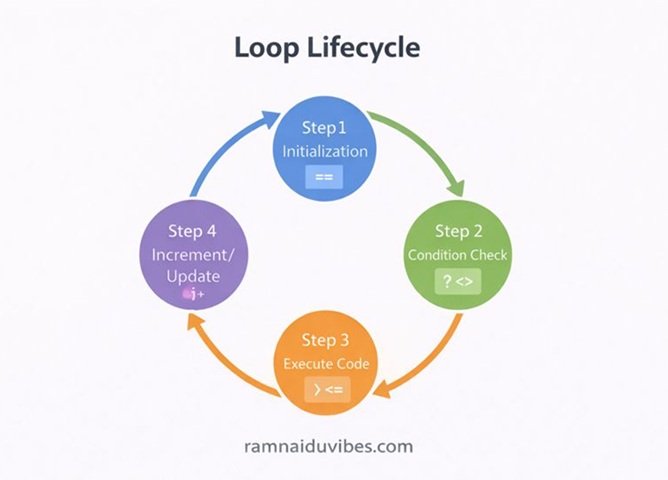
This is the most common loop. Use it when the number of iterations is fixed (e.g., “Do this 10 times”).
Real-Time Example: School Attendance
Imagine a teacher in a classroom. She knows there are exactly 30 students. She doesn’t check “forever”; she checks exactly from Roll No. 1 to Roll No. 30.
The Syntax Breakdown
Java
for (initialization; condition; update) {
// Code to repeat
}
- Initialization: Where do we start? (int i = 1)
- Condition: When do we stop? (i <= 30)
- Update: How do we move forward? (i++ meaning next student)
Solved Example: The Multiplication Table
Let’s print the table of 5 (5, 10, 15…).
Java
public class TableOfFive {
    public static void main(String[] args) {
        int number = 5;

        // Loop runs from 1 to 10
        for (int i = 1; i <= 10; i++) {
            System.out.println(number + " x " + i + " = " + (number * i));
        }
    }
}
Output:
Plaintext
5 x 1 = 5
5 x 2 = 10
…
5 x 10 = 50
Important Interview Questions (For Loop)
- Factorial Finder: Write a program to calculate the factorial of a number $n$ (e.g., $5! = 1 \times 2 \times 3 \times 4 \times 5 = 120$).
- Fibonacci Series: Print the first 10 numbers of the Fibonacci series (0, 1, 1, 2, 3, 5, 8…).
- Pattern Printing: Print a “Pyramid of Stars” with 5 rows.
2. The While Loop (The Waiter)
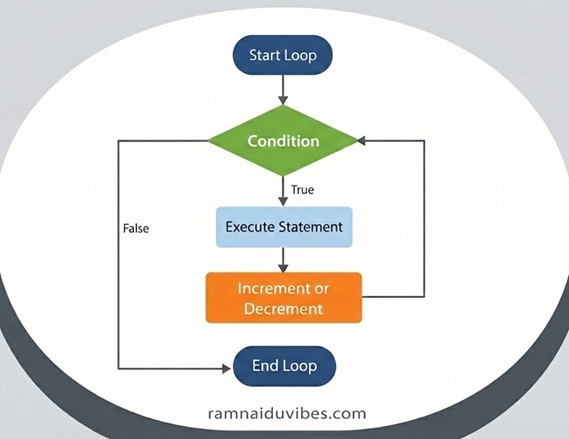
Use this loop when you don’t know how many times the loop will run. It depends on a condition.
Real-Time Example: Charging a Phone
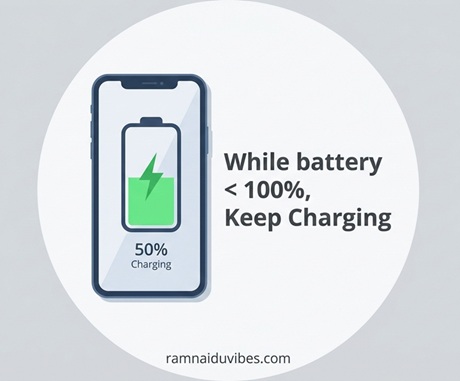
When you plug in your phone, do you know exactly how many minutes it needs? No.
You just keep it plugged in WHILE the battery is less than 100%.
- If battery is 50%, loop continues.
- If battery is 99%, loop continues.
- If battery is 100%, loop stops.
The Syntax Breakdown
Java
while (condition) {
// Code to repeat
// IMPORTANT: You must update the variable inside, or loop runs forever!
}
Solved Example: Countdown Timer
Java
public class Countdown {
    public static void main(String[] args) {
        int timer = 10;

        while (timer > 0) {
            System.out.println("Time left: " + timer);
            timer--; // Decrease time (Crucial step!)
        }
        System.out.println("Happy New Year!");
    }
}
Important Interview Questions (While Loop)
- Reverse a Number: Input 12345, Output 54321. (Hint: Use modulo % to get the last digit and division / to remove it).
- Palindrome Check: Check if a number reads the same backward and forward (e.g., 121 is a palindrome).
- Sum of Digits: Calculate the sum of all digits in a number (e.g., 123 $\rightarrow$ $1+2+3 = 6$).
3. The Do-While Loop (The Stubborn One)
This is a special loop. In for and while, if the condition is false at the start, the code never runs.
In do-while, the code runs at least once before checking the condition.
Real-Time Example: ATM Menu
When you insert your card, the ATM must show the menu (Withdraw, Balance, etc.) at least once.
Only after you finish a transaction does it ask: “Do you want to perform another transaction?”
The Syntax Breakdown
Java
do {
// This runs first, questions asked later.
} while (condition);
Solved Example: The “Guess the Number” Game
We want to keep asking the user for a number until they guess the correct one (e.g., 7). Even if they guess correctly immediately, we must ask them at least once.
Java
public class GuessGame {
    public static void main(String[] args) {
        int correctNumber = 7;
        int userGuess = 0; // Temporary value

        // Imagine 'userGuess' comes from Scanner input
        // For this example, let's simulate a guess logic

        do {
            System.out.println("Guess the number (1-10):");
            // Logic to get input would go here
            userGuess++; // Simulating guesses: 1, 2, 3...
        } while (userGuess != correctNumber);

        System.out.println("You found it!");
    }
}
Important Interview Questions (Do-While Loop)
- Menu Driven Calculator: Build a calculator that asks “Do you want to continue? (Y/N)” after every calculation.
- Input Validation: Ask the user to enter a positive number. If they enter a negative number, ask again immediately.
Summary: Which Loop Should I Use?
Loop Type | Best Used When… | Real World Analogy |
For Loop | You know the exact number of iterations. | School Roll Call (1 to 30). |
While Loop | You don’t know the iterations; depends on a condition. | Charging a Battery (Until Full). |
Do-While Loop | You need the code to run at least once. | ATM Menu (Show options first). |
Conclusion
You now have the power to automate repetitive tasks.
- You can count (For).
- You can wait for conditions (While).
- You can build menus (Do-While).
Next Step: Now that we have Logic and Loops, we are ready for the biggest topic in Java: Object Oriented Programming (OOPs).
👉 Read Next: Java OOPs Concepts Explained Simply