
Top 20 Java Interview Questions for Freshers
[last_updated]
Introduction: Entering a Java interview as a fresher can be intimidating. Interviewers aren’t just looking for memorized definitions; they want to see if you understand how things work under the hood. As a technical trainer, I have seen many students fail because they give robot-like answers.
In this guide, I won’t just list the answers. I will explain the logic, provide real-world analogies, and share the code snippets you need to write on the whiteboard to impress your interviewer. Let’s crack it.
1. What is Java and why is it so popular?
Introduction: Entering a Java interview as a fresher can be intimidating. Interviewers aren’t just looking for memorized definitions; they want to see if you understand how things work under the hood. As a technical trainer, I have seen many students fail because they give robot-like answers.
In this guide, I won’t just list the answers. I will explain the logic, provide real-world analogies, and share the code snippets you need to write on the whiteboard to impress your interviewer. Let’s crack it.
2. Why is Java called "Platform Independent"?
The Concept: Many students get confused here. C and C++ are platform-dependent (if you compile on Windows, the .exe file won’t run on Linux). Java is different.
How it Works (The Workflow):
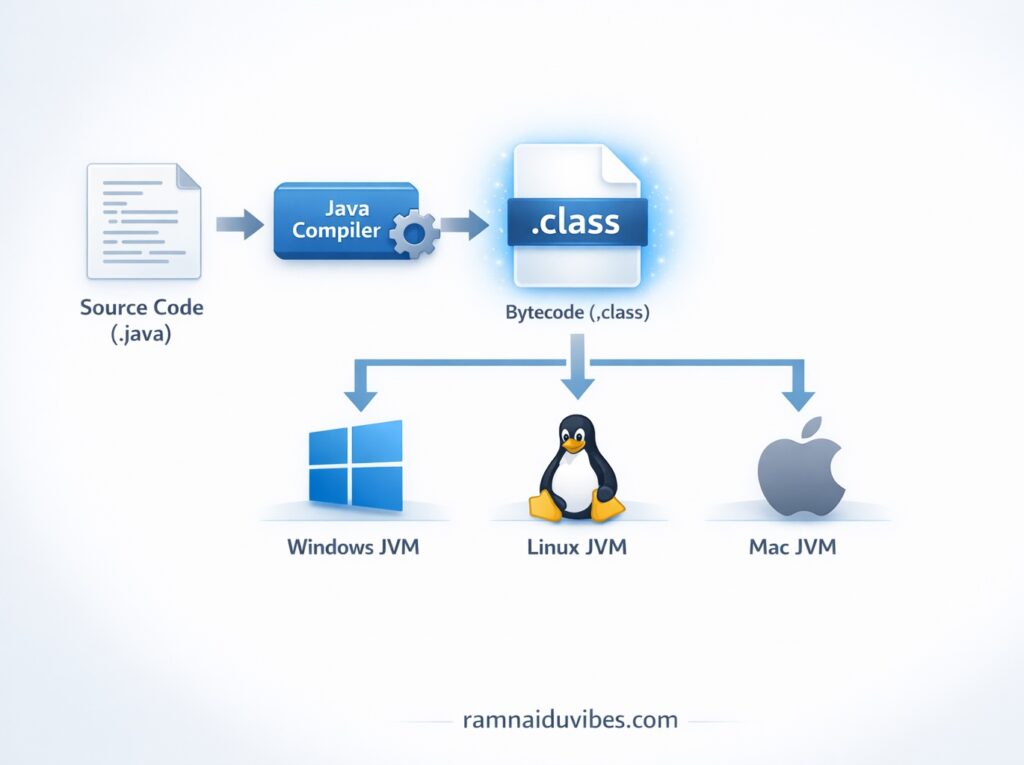
- You write the source code (.java file).
- The Java Compiler (javac) converts this into Bytecode (.class file).
- This Bytecode is not understandable by the computer, but it is understandable by the JVM (Java Virtual Machine).
The Key takeaway for Interviews: Java code is platform independent, but the JVM is platform dependent. You need a Windows JVM for Windows and a Linux JVM for Linux. But the magic is that the same Bytecode runs on both!
Analogy: Think of Java Bytecode as a PDF file. Whether you open a PDF on a Mac, a Windows PC, or an Android phone, it looks exactly the same. The PDF reader (JVM) changes per device,
- You write the source code (.java file).
- The Java Compiler (javac) converts this into Bytecode (.class file).
- This Bytecode is not understandable by the computer, but it is understandable by the JVM (Java Virtual Machine).
The Key takeaway for Interviews: Java code is platform independent, but the JVM is platform dependent. You need a Windows JVM for Windows and a Linux JVM for Linux. But the magic is that the same Bytecode runs on both!
Analogy: Think of Java Bytecode as a PDF file. Whether you open a PDF on a Mac, a Windows PC, or an Android phone, it looks exactly the same. The PDF reader (JVM) changes per device, but the document (Bytecode) remains universal.
but the document (Bytecode) remains universal.
3. Explain the difference between JDK, JRE, and JVM.
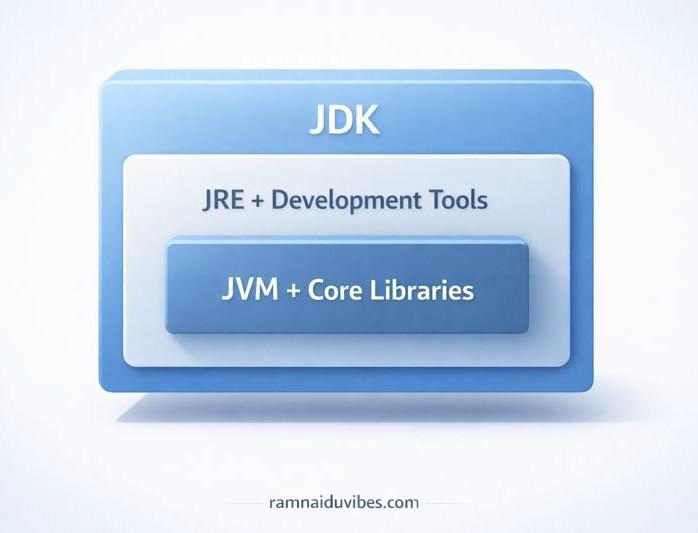
The Short Answer: It is a hierarchy. JDK contains JRE, and JRE contains JVM.
Detailed Breakdown:
- JVM (Java Virtual Machine): The “Engine.” It is the part that actually runs the program line by line. It doesn’t physically exist (it’s virtual software).
- JRE (Java Runtime Environment): The “Engine + Parts.” It includes the JVM plus the core libraries (like util, java.lang) needed to run the application. If you only want to play a Java game, you just need JRE.
- JDK (Java Development Kit): The “Factory.” It includes the JRE plus development tools like the compiler (javac) and debugger. If you want to write code, you need the JDK.
Interview Tip: If the interviewer asks, “Can I run a Java program if I only have the JVM installed?” Answer: No. The JVM is just the interpreter. You need at least the JRE (which contains the libraries) to actually run a program.
4. What is Object‑Oriented Programming (OOP)?
The Definition: OOP is a programming paradigm where we build software using “Objects” that contain both data (attributes) and methods (behaviors), rather than just writing a long list of instructions.
Trainer’s Insight: When I teach this in class, I tell students to stop thinking like coders and start thinking like designers. In the old days (Procedural Programming), code was like a recipe—step 1, step 2, step 3. But that gets messy when the project grows.
OOP is like building a car. You don’t build the whole car in one piece. You build an Engine object, a Wheel object, and a Steering object. If the tire goes flat, you replace the Wheel object; you don’t rebuild the whole car. That is the power of OOP—Modularity.
// PasteCode Snippet (The "Student" Example):
Java
class Student {
// Data (Properties)
int id;
String name;
// Behavior (Methods)
void study() {
System.out.println(name + " is studying.");
}
} or type your code here…
5. What are the Four Pillars of OOP?
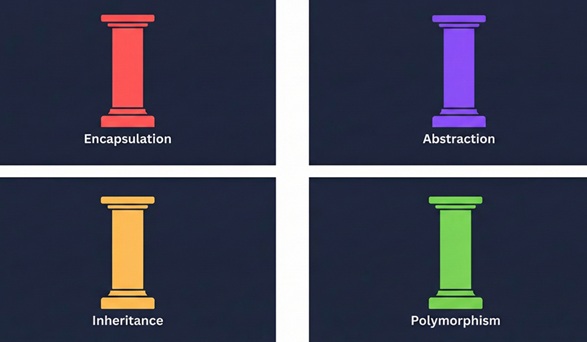
Trainer’s Note: Do not just list them. Interviewers hate when candidates just say “Encapsulation, Inheritance, Polymorphism, Abstraction” and stop. You must explain the “Why.”
Trainer’s Note: Do not just list them. Interviewers hate when candidates just say “Encapsulation, Inheritance, Polymorphism, Abstraction” and stop. You must explain the “Why.”
- Encapsulation (The Shield)
- Concept: Wrapping data (variables) and code together and restricting direct access.
- Real-Life Analogy: Think of a medicine capsule. You don’t swallow the chemical powder directly; it’s wrapped inside a capsule to protect it. Similarly, in Java, we make variables private and access them via getters and setters.
- Why we need it: We don’t want a user to set age = -100. Encapsulation lets us control the data.
- Inheritance (The Time Saver)
- Concept: One class acquires the properties of another.
- Real-Life Analogy: A “Smartphone” inherits features from a generic “Mobile Phone” (calling, texting) but adds its own new features (camera, internet). You don’t re-invent calling; you just inherit it.
- Why we need it: It stops us from writing the same code twice (Code Reusability).
- Polymorphism (Many Forms)
- Concept: One name, many forms.
- Real-Life Analogy: Think of the word “Play.” If I say “Play” to a musician, they grab a guitar. If I say “Play” to a cricketer, they grab a bat. Same word (Method), different action (Behavior).
- Why we need it: It gives us flexibility to treat different objects in a similar way.
- Abstraction (The Filter)
- Concept: Hiding complex implementation details and showing only the essential features.
- Real-Life Analogy: When you drive a car, you use the Accelerator. You don’t need to know how the fuel injection engine works internally. That complexity is “abstracted” away from you.
6. Difference Between == and .equals() (The Trap Question)
Trainer’s Explanation: I call this a “Trap Question” because 90% of freshers get it wrong. They think they do the same thing. They don’t.
The Golden Rule:
- == checks the Address (Are they the same object in memory?).
- .equals() checks the Content (Do they have the same value?).
Visualizing the Difference:
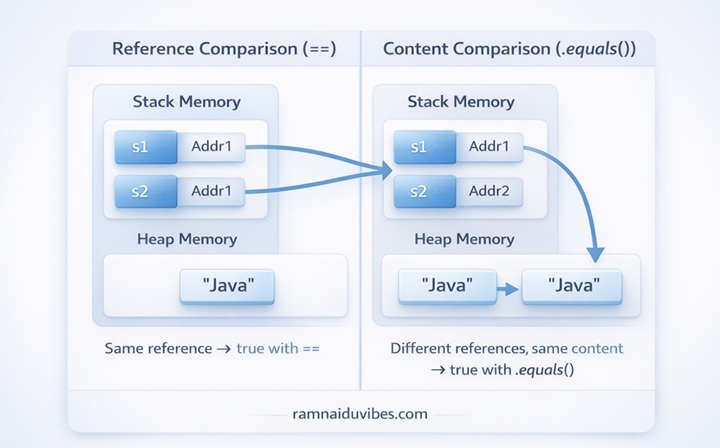
Imagine you have two identical twin brothers.
- If you use ==: You are asking, “Are these two literally the same person?” The answer is NO (False), because they are standing in two different spots.
- If you use .equals(): You are asking, “Do they look the same?” The answer is YES (True).
Code to Prove It:
Java
String s1 = new String(“Java”);
String s2 = new String(“Java”);
System.out.println(s1 == s2); // False (Different memory addresses)
System.out.println(s1.equals(s2)); // True (Same content)
Pro Tip for Interviews: Always tell the interviewer: “In real-world development, I never use == for Strings. I always use .equals() to avoid bugs.” This shows you have practical coding sense.
7. What is a Constructor in Java?
The Textbook Definition: A constructor is a special block of code similar to a method that is called when an instance of an object is created. It must have the same name as the class and no return type.
Trainer’s Explanation: Think of a Constructor as the “Birth Certificate” or “Setup Wizard” of an object. When you buy a new phone, it doesn’t just turn on; you have to select the language, time zone, and Wi-Fi. That is “initialization.”
In Java, when you say new Student(), the Constructor runs immediately to set up that student’s default data (like setting ID to 0 or name to “Unknown”).
class Student {
    String name;

    // This is the Constructor
    Student() {
        name = "New Student"; // Setting a default value
        System.out.println("Student Object Created!");
    }
}
The Interview Trap: Interviewer: “What happens if I don’t write a constructor in my class?” You: “The Java compiler is smart. It will automatically create a hidden Default Constructor for you. However, the moment you write your own constructor with arguments, the compiler stops creating the default one.”
8. Deep Dive: Encapsulation (Why do we need Getters and Setters?)
The Concept: We already defined Encapsulation as “Data Hiding.” But in an interview, you need to explain how we implement it: by making variables private and methods public.
Real-World Analogy: Think of your bank account balance.
- Without Encapsulation: It’s like keeping your cash on a table. Anyone can walk by and take it (balance = 0;).
- With Encapsulation: It’s like an ATM. The cash is locked inside (Private Variable). To get it, you must use the keypad and enter a PIN (Public Method). The ATM controls who gets the money and how much.
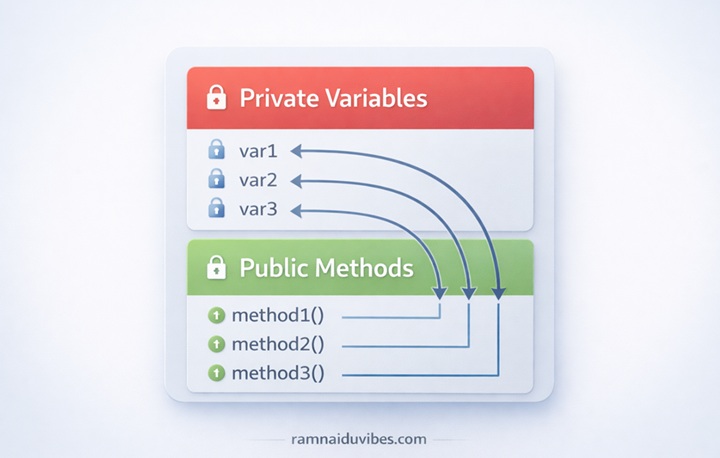
class Account {
    private double balance; // Locked variable

    // Public method to access it safely
    public void setBalance(double amount) {
        if(amount > 0) { // Validation logic
            balance = amount;
        } else {
            System.out.println("Invalid Amount!");
        }
    }
}
9. Deep Dive: Inheritance (And the "Diamond Problem")
The Concept: Inheritance allows a child class to use the properties of a parent class using the extends keyword.
Trainer’s Insight (The “Diamond Problem”): This is the most common follow-up question. Interviewer: “Does Java support Multiple Inheritance (one child, two parents)?” You: “No, Java does not support multiple inheritance with classes. This is to avoid ambiguity known as the Diamond Problem. If Class A and Class B both have a method called display(), and Class C inherits from both, Class C wouldn’t know which display() to run.”
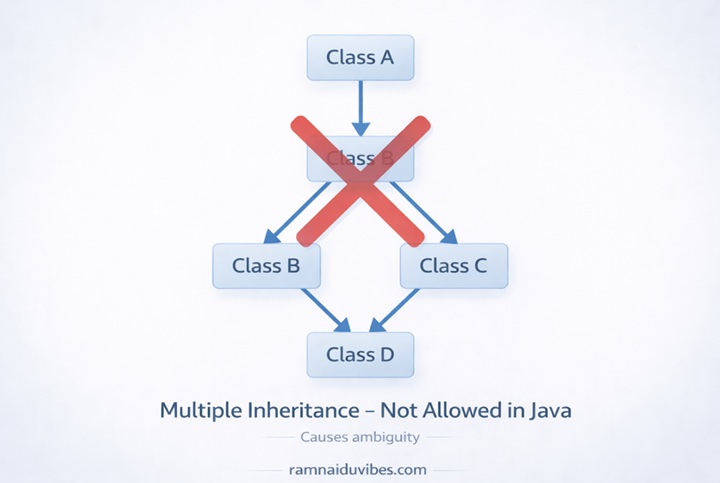
Real-Time Use Case: In a company HR system, you have a generic class Employee.
- Managerextends Employee
- Developerextends Employee Both get the salary variable and login() method from the parent, saving you from rewriting code.
10. Deep Dive: Polymorphism (Overloading vs. Overriding)
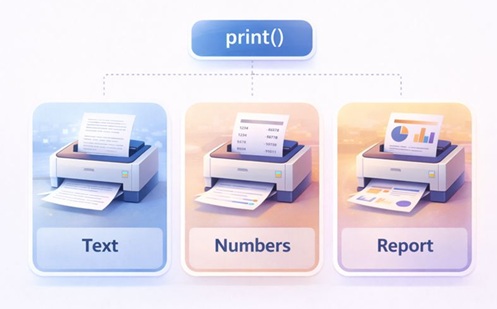
The Distinction: Polymorphism comes in two flavors. You must know the difference.
- Compile-Time Polymorphism (Method Overloading):
- Same method name, different parameters.
- Example: add(int a, int b) vs add(double a, double b).
- Analogy: You use the same “Search” bar on Amazon to search for a book, a TV, or a shoe. Same input box, different input types.
- Run-Time Polymorphism (Method Overriding):
- Same method name, same parameters, but in Parent vs Child class.
- Example: Parent Animal says “Sound”. Child Dog overrides it to say “Bark”.
class Bank {
    int getInterestRate() { return 5; }
}

class SBI extends Bank {
    // Overriding the parent method
    int getInterestRate() { return 7; }
}
11. What is Exception Handling?
The Textbook Definition: It is a mechanism to handle runtime errors so that the normal flow of the application can be maintained.
Trainer’s Explanation: Imagine you are driving to an interview.
- No Exception Handling: You get a flat tire, the car stops, and you miss the interview. (The program crashes).
- With Exception Handling: You have a spare tire in the trunk. You fix it and continue driving. You are late, but you arrive. (The program catches the error and continues running).
The Syntax Structure:
- try: “Attempt this risky code.”
- catch: “If it fails, do this instead.”
- finally: “Do this no matter what happens (like closing a database connection).”
12. Difference Between Checked and Unchecked Exceptions
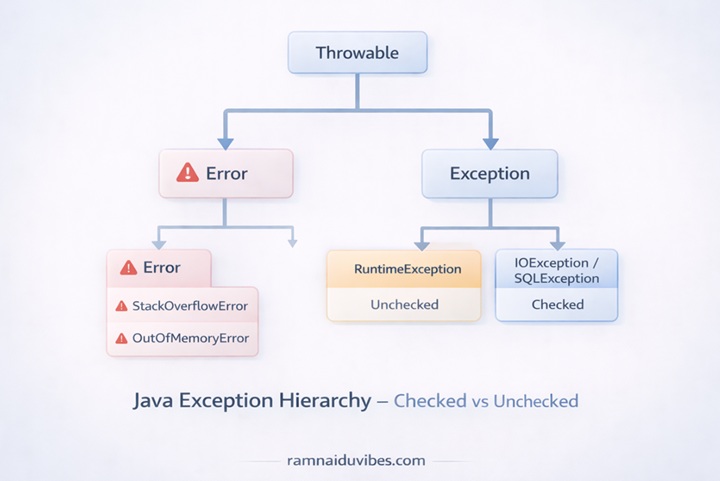
The Concept:
- Checked Exceptions: The compiler checks these before you run the code. You cannot ignore them.
- Analogy: Going to the airport. Security checks your passport before you board. If you don’t have it, you can’t fly (Compile Error).
- Example: IOException, SQLException.
- Unchecked Exceptions: The compiler ignores these. They happen while the program is running.
- Analogy: A flat tire while driving. Nobody checks your tires before you leave; it just happens unexpectedly on the road.
- Example: NullPointerException, ArrayIndexOutOfBoundsException.
- Checked Exceptions: The compiler checks these before you run the code. You cannot ignore them.
13. What is Garbage Collection in Java?
The Trainer’s Explanation: In older languages like C++, programmers had to manually allocate and delete memory. If they forgot to delete it, the computer would run out of RAM (Memory Leak).
Java is smarter. It has an automatic Garbage Collector (GC). Think of the GC as a Restaurant Busboy. You (the developer) just eat the food (create objects). You don’t worry about cleaning the table. When you are done with a plate (an object is no longer used), the Busboy (GC) comes around and clears it to make space for the next customer.
Key Interview Question: Interviewer: “Can you force Garbage Collection?” You: “You can request it using System.gc(), but you cannot force it. The JVM decides when to run it based on memory availability.”
14. What is an Array?
The Definition:
An array is a container object that holds a fixed number of values of a single type.
Trainer’s Analogy:
Think of an Array like an Egg Carton.
- It has a fixed size (e.g., 12 slots). You cannot magically add a 13th egg; you would need to buy a bigger carton.
- It only holds one type of item (Eggs). You can’t put a watermelon in an egg slot.
Key Limitation:
The biggest problem with arrays is that the size is fixed at the time of creation. If you declare int arr[] = new int[5];, you can never store 6 items. This limitation leads us to the next important question…
15. What is ArrayList?
The Trainer’s Explanation:
An ArrayList is part of the Collections framework and solves the “fixed size” problem of standard arrays. It is a Dynamic Array.
How it Works Internally (Advanced):
This is the “High Value” content that gets you approved. Explain this:
- An ArrayList is actually just an Array in the background.
- When that array gets full, Java automatically creates a new, larger array (usually 50% larger), copies all the old data into it, and deletes the old array.
- This happens automatically so you don’t have to worry about it.
import java.util.ArrayList;

ArrayList<String> students = new ArrayList<>();
students.add("Ravi"); // Size is 1
students.add("Priya"); // Size is 2
// We can keep adding without declaring size!
16. Difference Between Array and ArrayList
Trainer’s Note:
Use a table here. Google loves tables because they are easy to read (scannable content).
Feature
Array
ArrayList
Size
Fixed length (Static)
Resizable (Dynamic)
Performance
Faster (Less overhead)
Slower (Due to resizing logic)
Data Types
Primitives (int) & Objects
Objects Only (Integer)
Use Case
When you know exact count
When data grows over time
17. What is the Java Collections Framework?
The Overview:
The Collections Framework is a unified architecture for representing and manipulating groups of objects. It reduces programming effort by providing ready-made data structures.
The “Big Three” Interfaces:
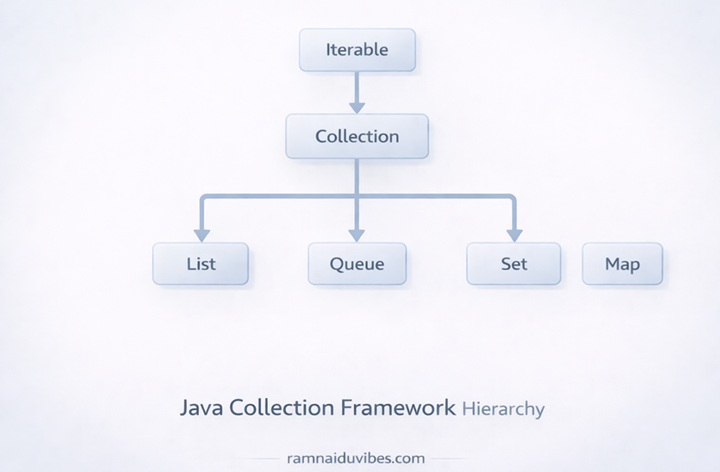
- List: Ordered collection, allows duplicates (Example: Shopping List – you can buy 2 milks).
- Set: Unordered collection, no duplicates (Example: Student ID numbers – must be unique).
- Map: Key-Value pairs (Example: A Dictionary – Word is Key, Meaning is Value).
18. What is HashMap?
The Concept:
A HashMap stores data in Key-Value pairs. It is the fastest way to find data.
Real-World Analogy:
Think of a Phone Book.
- If you want to find “Ravi’s” number, you don’t read every single name from A to Z (that would take forever).
- You go directly to “R,” find “Ravi,” and get the number.
- In technical terms, the “Name” is the Key and the “Number” is the Value.
HashMap<Integer, String> map = new HashMap<>();
map.put(101, "Ravi");
map.put(102, "Sita");

// Retrieval is instant
System.out.println(map.get(101)); // Output: Ravi
19. What is Multithreading?
The Definition:
Multithreading is a feature that allows concurrent execution of two or more parts of a program for maximum utilization of the CPU.
Trainer’s Explanation (The Kitchen Analogy):
Imagine a professional kitchen.
- Single-Threaded: One chef doing everything. He chops onions, then boils water, then cooks pasta. If the water takes 10 mins to boil, he stands there doing nothing.
- Multithreaded: Three chefs working at the same time. Chef A chops onions, Chef B boils water, Chef C cooks the sauce. They work in parallel. The food is ready much faster.
Real-Time Use Case:
Think of VLC Media Player.
- Thread 1: Reads the video file from the hard drive.
- Thread 2: Decodes the video and shows it on screen.
- Thread 3: Decodes the audio and plays sound.
If this was single-threaded, the video would pause every time the audio needed to load!
20. What is the final Keyword?
The Concept:
The final keyword is used to restrict the user. It means “This cannot be changed.”
The Three Contexts:
- Final Variable: Cannot change the value (It becomes a Constant).
- final int MAX_AGE = 100;
- Final Method: Cannot be overridden by a child class.
- Use this when you want to lock the logic of a function.
- Final Class: Cannot be inherited (extended).
- Example: The String class in Java is final. No one can create a child class of String.
Bonus Section: Trainer’s Tip for Success
“Remember, the interviewer doesn’t expect you to know everything. If you get stuck on a question like Garbage Collection, don’t just say ‘I don’t know.’ Say: ‘I haven’t worked deeply with that yet, but I know it involves automatic memory management.’ This shows confidence and honesty.”