
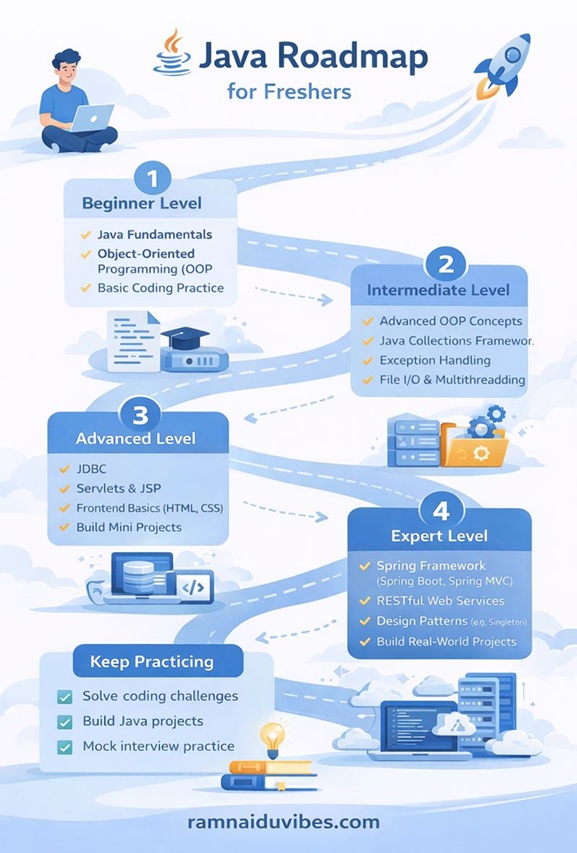
The Ultimate Java Learning Roadmap for Freshers (2025 Edition)
[last_updated]
From "Hello World" to Your First Job – A Step-by-Step Guide
Introduction:
“I meet hundreds of students who say, ‘I know Java,’ but they fail the interview. Why? Because they learned random topics without a plan. They know loops but don’t know Collections. They know Theory but have never built a Project.
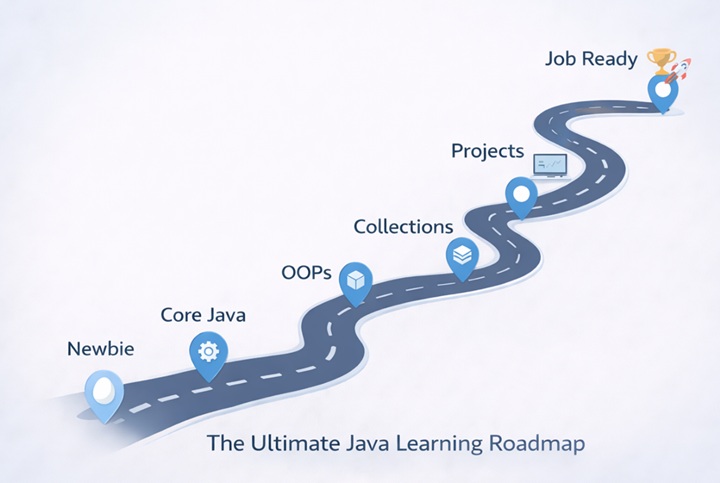
Today, I am sharing the exact Java Learning Roadmap I use in my training sessions. This isn’t just a list of topics; it is a schedule. If you follow this for 60 Days, you will be job-ready.”
Phase 1: The Foundation (Days 1–7)
Goal: Stop fearing the code. Understand the syntax and logic.
What to Learn:
- The Ecosystem:JVM, JRE, and JDK (Don’t just memorize definitions; understand how code runs).
- Variables & Data Types: int vs Integer (Primitives vs Wrappers).
- Control Flow: if-else, switch, and loops.
🛑 Checkpoint Challenge:
Before moving to Phase 2, can you write a program to print a generic “Pyramid Pattern” using nested loops without looking at Google? If not, stay here.
Trainer’s Tip:
“Don’t use a fancy IDE like IntelliJ or Eclipse yet. Write your code in Notepad and compile it using the Command Prompt (javac). This forces you to learn syntax and fix errors manually.”
Phase 2: Core Java & Logic Building (Days 8–15)
Goal: Master the tools you will use 90% of the time.
Key Topics:
- Arrays: 1D and 2D arrays.
- Strings: Why Strings are immutable. The difference between String, StringBuilder, and StringBuffer.
- Methods: How to pass parameters and return values.
interview Spotlight:
“Interviewers love asking: ‘Reverse a string without using the built-in reverse() function.’ Make sure you can write the logic for this using a for loop.”
Phase 3: Object-Oriented Programming (Days 16–25)
Goal: Stop writing “Scripting” code and start writing “Software” code.
The Big 4 Concepts:
- Encapsulation: Protecting your data.
- Inheritance: Reusing code (Parent $\rightarrow$ Child).
- Polymorphism: Method Overloading vs Overriding.
- Abstraction: Interfaces vs Abstract Classes.
The “Aha!” Moment:
Don’t just read the definitions. Build a mini-system.
- Project: Create a “Bank Account”
- Use Encapsulation to hide the balance.
- Use Inheritance for SavingsAccount and CurrentAccount.
Phase 4: Exception Handling & Robustness (Days 26–30)
Goal: Write code that doesn’t crash when things go wrong.
The Reality Check:
In the real world, files go missing, internet connections drop, and users enter invalid data. If your program crashes every time this happens, you have failed.
Key Topics:
- Try-Catch-Finally: The safety net. Understand that finally runs no matter what (perfect for closing connections).
- Throw vs. Throws: One actually throws the error; the other warns the compiler that “this might happen.”
- Custom Exceptions: How to create your own error (e.g., InsufficientFundsException for a banking app).
Trainer’s Tip:
“Don’t just catch generic Exception e. That is lazy coding. Catch specific exceptions like FileNotFoundException or ArithmeticException. This shows interviewers you know exactly what errors to expect.”
Phase 5: The Collections Framework (The Job-Getter)
Goal: Handling real data. If you don’t know Collections, you won’t clear the technical round.
Must-Master Topics:
- List: ArrayList vs LinkedList.
- Set: HashSet (Removing duplicates).
- Map: HashMap (Key-Value pairs).
Trainer’s Insight:
“90% of coding interview questions (like ‘Find the frequency of characters in a string’) are solved easily using a HashMap. If you master Maps, you master the interview.”
Phase 6: Multithreading & Concurrency (Days 31–35)
Goal: Learn how to do multiple things at once.
Why This Matters:
Imagine a video game. If the game pauses every time it plays a sound effect, nobody would play it. Multithreading allows the graphics, sound, and user input to run simultaneously.
Key Topics:
- The Thread Life Cycle: New $\rightarrow$ Runnable $\rightarrow$ Running $\rightarrow$ Blocked $\rightarrow$ Dead.
- Creating Threads: Extending Thread class vs. implementing Runnable interface (Hint: Runnable is better).
- Synchronization: preventing two threads from accessing the same bank account at the exact same time (The “Race Condition”).
Checkpoint Challenge:
Write a program with two threads: One prints numbers 1-100, and the other prints alphabets A-Z. Run them and observe how the output mixes together.
Phase 7: Modern Java (Java 8+) (Days 36–42)
Goal: Stop writing code like it’s 2005. Learn the modern syntax.
The “Must-Know” Features:
Java 8 changed everything. If you go to an interview today and don’t know Streams, you are at a huge disadvantage.
- Lambda Expressions: Writing shorter, cleaner code.
- Stream API: Filtering and mapping data lists without complex for
- Optional Class: The modern way to handle NullPointerException.
Code Comparison (The “Value Add”):
- Old Way: Iterate through a list of names, check if they start with “A”, and print them. (6 lines of code).
- New Way (Streams): stream().filter(n -> n.startsWith(“A”)).forEach(System.out::println); (1 line of code).
Phase 8: The Developer Toolbelt (Days 43–45)
Goal: Stop keeping your code in folders named Project_Final_Final_V2. Start working like a professional.
The Reality Check: In a real company, you never work alone. You work in a team. This means you need to share code without overwriting each other’s work (Git) and manage hundreds of libraries without downloading them manually (Maven).
Key Topics:
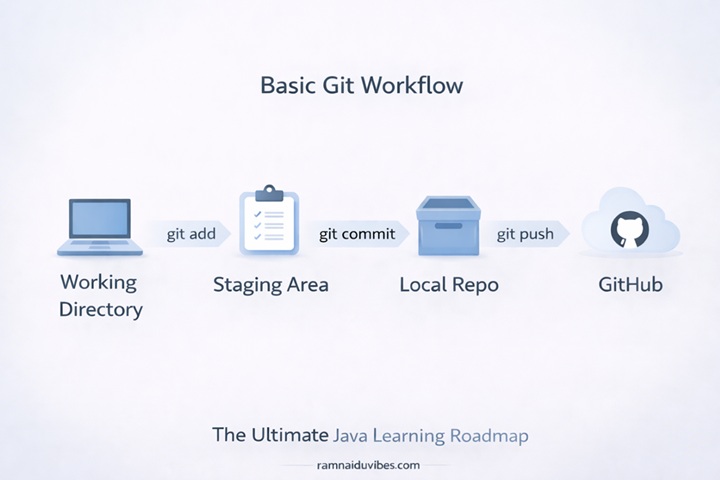
- Git (Version Control): The “Undo” button for your entire project. Learn the basic commands: git init, git add, git commit, git push.
- GitHub/GitLab: This is your new “Resume.” Recruiters look at your GitHub profile to see if you actually code.
- Maven: Stop downloading .jar files from the internet and adding them to your classpath manually. Learn how to use a xml file to automatically download dependencies (like the MySQL connector or Spring Boot).
Trainer’s Tip (The “Senior Dev” Secret):
“One of the biggest mistakes freshers make is uploading their .class files or target folder to GitHub. This is unprofessional. Learn how to use a .gitignore file to tell Git to ignore the junk and only upload your Source Code.”
Checkpoint Challenge: Create a GitHub repository. Write a simple ‘Calculator’ program locally. Push it to GitHub. Then, delete the code from your computer and ‘Clone’ it back from GitHub to prove you didn’t lose it.
- Git (Version Control): The “Undo” button for your entire project. Learn the basic commands: git init, git add, git commit, git push.
- GitHub/GitLab: This is your new “Resume.” Recruiters look at your GitHub profile to see if you actually code.
- Maven: Stop downloading .jar files from the internet and adding them to your classpath manually. Learn how to use a xml file to automatically download dependencies (like the MySQL connector or Spring Boot).
Trainer’s Tip (The “Senior Dev” Secret):
“One of the biggest mistakes freshers make is uploading their .class files or target folder to GitHub. This is unprofessional. Learn how to use a .gitignore file to tell Git to ignore the junk and only upload your Source Code.”
Checkpoint Challenge: Create a GitHub repository. Write a simple ‘Calculator’ program locally. Push it to GitHub. Then, delete the code from your computer and ‘Clone’ it back from GitHub to prove you didn’t lose it.
Phase 9: Databases & JDBC (Days 46–50)
Goal: Making your data permanent.
The Concept:
Up until now, every time you stopped your program, your data disappeared (RAM is volatile). Now, we connect to a Database (SQL) to store it forever.
Key Topics:
- SQL Basics: You need to know SELECT, INSERT, UPDATE, and DELETE.
- JDBC (Java Database Connectivity): The bridge between your Java code and the MySQL database.
- The Driver Manager: Loading the specific driver for your database.
Trainer’s Insight:
“Many freshers struggle here because they don’t have MySQL installed. Spend Day 43 just setting up MySQL Workbench and learning to create a table manually before you try to connect Java to it.”
Phase 10: Advanced Java & Frameworks (Days 51–60)
Goal: The transition from “Student” to “Developer.”
The Roadmap to Frameworks:
You cannot jump straight to Spring Boot. You must understand the hierarchy:
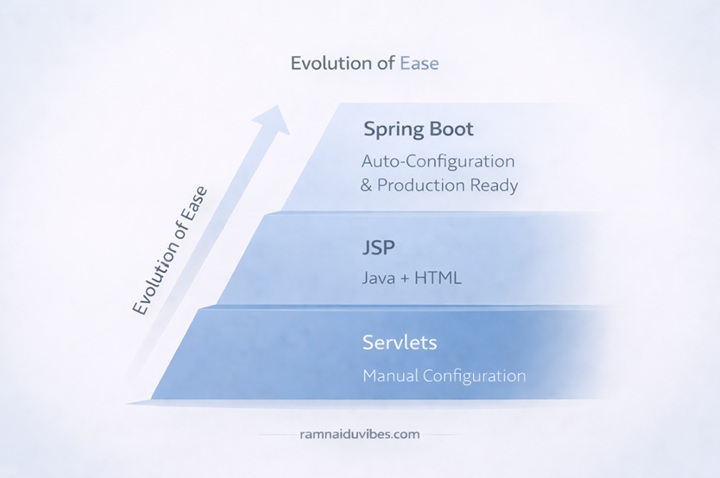
- Servlets: The original way Java handled web requests. (Learn the lifecycle: init, service, destroy).
- JSP (Java Server Pages): embedding Java code inside HTML.
- Spring Boot: The industry standard. It automates 90% of the configuration work.
Trainer’s Advice:
“For a fresher role, you don’t need to be an expert in Spring Boot. But if you can build a simple REST API (e.g., an API that takes a Student ID and returns their marks in JSON format), you are instantly ahead of 80% of other candidates.”
Phase 11: The Portfolio Projects (The Proof)
Instead of just listing ideas, tell them what features to build to impress a recruiter.
- Student Management System (Console Based)
- Tech: Core Java, Collections, File I/O.
- Features: Add Student, Update Marks, Delete Student, Save data to a .txt file so it isn’t lost when the program closes.
- Employee Management System (Database)
- Tech: JDBC, MySQL.
- Features: Perform complete CRUD operations (Create, Read, Update, Delete) on a real database.
Phase 12: The Interview Prep Strategy
Goal: Turning knowledge into an offer letter.
Don’t wait until the day before the interview. Start this in parallel with Phase 10 (Projects).
- Mock Interviews: Stand in front of a mirror and explain “Polymorphism” out loud. If you stumble, you don’t know it well enough.
- Whiteboard Coding: Practice writing code on paper. In many interviews, you won’t have a computer with auto-correct.
- Resume Prep: Ensure your projects from Phase 10 are listed with technical keywords (e.g., “Built a Student Management System using Java Collections and JDBC“).
Final Words from the Trainer
“Learning Java is a marathon, not a sprint. You will get stuck. You will see errors you don’t understand. That is part of the process. Stick to this roadmap for 60 days, build the projects, and I promise you will see the results.
Ready to start? Download my free [Java Syntax Cheat Sheet] (Link to your future lead magnet) and write your first ‘Hello World’ today!”