
What Is DevOps? Simple Explanation for Absolute Beginners
[last_updated]
Introduction: The “It Works on My Machine” Problem
Imagine this scenario: A developer writes code for a new login feature. It works perfectly on their laptop. They send it to the Operations team to deploy it to the live server. Suddenly, the website crashes.
- The Developer says: “It works on my machine! It must be a server issue.”
- The Operations Engineer says: “The server is fine! Your code is broken.”
This “Blame Game” was the reality of software development for decades. The solution to this chaos is DevOps.
1. What Is DevOps?
The Textbook Definition: DevOps is a set of practices that combines Software Development (Dev) and IT Operations (Ops). It aims to shorten the systems development life cycle and provide continuous delivery with high software quality.
The Trainer’s Explanation: DevOps is not a tool you can buy. You cannot go to Amazon and order “One box of DevOps.” DevOps is a mindset. It is a culture shift where the people who build the software (Devs) and the people who run the software (Ops) work as a single team with a shared goal: delivering value to the customer.
The Core Formula:
DevOps = Culture + Automation + Measurement + Sharing (CAMS)
2. Why Do We Need DevOps? (A Brief History)
To understand why DevOps exists, you need to understand how we used to work.
- The Waterfall Era (The Old Way): Teams worked in silos. Developers wrote code for months, then threw it “over the wall” to testers, who then threw it to Operations. If a bug was found, the whole process restarted. It was slow and painful.
- The Agile Era (2000s): Developers started working faster, releasing updates every 2 weeks. But Operations teams couldn’t keep up! They became the bottleneck.
- The DevOps Era (2009 – Present): DevOps broke down the wall. Now, Operations engineers are involved before the code is even written, and Developers help manage the servers.
3. The 3 Pillars of DevOps
A. Collaboration (The Culture)
In a DevOps culture, there are no “silos.”
- Before: “That’s not my job.”
- After: “How can we fix this together?”
B. Automation (The Engine)
Humans make mistakes; computers don’t. DevOps relies heavily on automating repetitive tasks.
- Manual Way: An engineer manually logs into a server, copies files, and restarts services. (Takes 30 mins, high risk of error).
- DevOps Way: A script does all of this automatically in 30 seconds every time code is saved.
C. CI/CD (The Heartbeat)
You will hear this term in every interview.
- CI (Continuous Integration): Developers merge their code changes into a central repository multiple times a day. Automated tests run immediately to catch bugs.
- CD (Continuous Delivery/Deployment): The code is automatically deployed to testing or production environments without manual intervention.
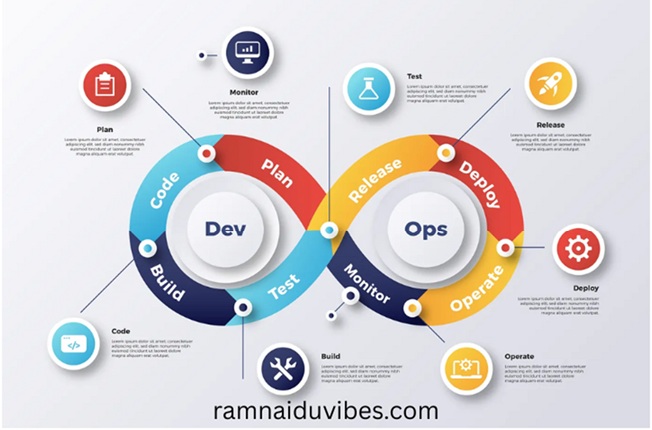
4. The DevOps Lifecycle (The Infinity Loop Explained)
You have likely seen the famous “Infinity Loop” symbol associated with DevOps. It isn’t just a logo; it represents the continuous nature of the process. Let’s break down each stage:
- Plan: The team defines the features and requirements.
- Code: Developers write the code.
- Build: The code is compiled and packaged into executable files.
- Test: Automated tests run to check for bugs. If a bug is found, it goes back to “Code.”
- Release: The stable build is prepared for deployment.
- Deploy: The application is pushed to production servers.
- Operate: The application is live and running.
- Monitor: We track the system’s health. If users face errors, the feedback loops back to the “Plan” phase.
5. The DevOps Toolchain: What Should You Learn?
A common question I get from students is, “Which tools should I learn first?” While DevOps is a mindset, you still need tools to implement it. Here is the standard “Starter Kit” for a fresher:
- Version Control: Git (Mandatory. You cannot do DevOps without Git).
- CI/CD: Jenkins (The industry standard) or GitHub Actions (Rising in popularity).
- Containerization: Docker (For packaging applications).
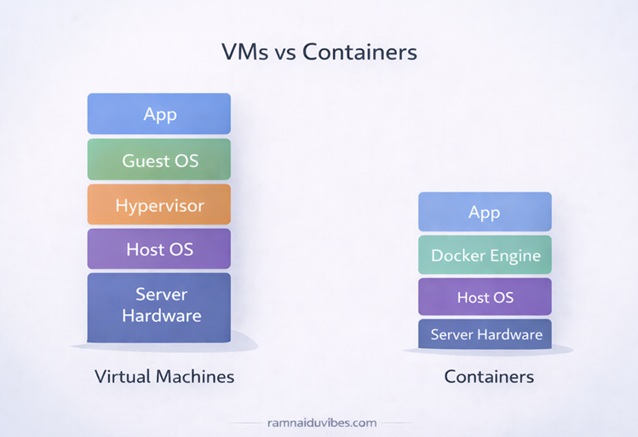
- Orchestration: Kubernetes (For managing Docker containers at scale).
- Infrastructure as Code (IaC): Terraform (For creating servers using code).
- Cloud: AWS or Azure (Pick one and master it).
Trainer’s Advice:
“Don’t try to learn all of these at once. Start with Linux and Git. Once you are comfortable, move to Docker. If you try to learn Kubernetes on Day 1, you will get overwhelmed.”
6. Roles & Responsibilities: What Does a DevOps Engineer Do?
If you get hired as a “Junior DevOps Engineer,” what will your day look like? You won’t just be coding.
- Setting up Pipelines: You will create workflows that automatically test and deploy code.
- Server Management: You will ensure servers are running, updated, and secure.
- Troubleshooting: If the website goes down at 2 AM, you are the one who gets the alert to fix it.
- Automation: You will write scripts (Python or Bash) to automate boring tasks like database backups.
7. Key Benefits of DevOps
Why are companies paying high salaries for DevOps Engineers? Because it saves them money and time.
- Faster Time to Market: Companies like Amazon and Netflix deploy updates thousands of times per day.
- Higher Quality: Automated testing catches bugs before they reach the customer.
- Less Downtime: If the site crashes, automated recovery systems can bring it back up in seconds.
8. Summary: The "Trainer's Insight"
If you are a fresher learning DevOps, do not start by memorizing tools like Jenkins or Kubernetes. Start by understanding the flow.
Trainer’s Tip:
“DevOps is not about knowing 50 different tools. It is about knowing which tool solves which problem. Focus on the pipeline: How does code get from a developer’s laptop to a customer’s screen? Once you understand that path, the tools become easy to learn.”