
What is Apache Maven? The Ultimate Beginner’s Guide
[last_updated]
Stop managing JAR files manually. Let Maven do the hard work.
Introduction: The "Missing File" Nightmare
If you are a Java developer, DevOps engineer, or a Fresher, you have likely faced this problem:
- You download a project from the internet.
- You try to run it in Eclipse or IntelliJ.
- Error: ClassNotFoundException or Missing JAR file.
You spend hours searching Google for the right library, downloading it, and adding it to your classpath. Two days later, you send the project to your friend, and it fails on their machine too.
Stop doing this. There is a tool that fixes this chaos forever. It is called Apache Maven.
In this guide, I will explain Maven in simple English, decoding the scary terms like pom.xml, build lifecycle, and repositories.
1. What is Maven? (The Chef Analogy)
The Definition: Apache Maven is a Build Automation Tool and Project Management Tool primarily for Java applications.
The Trainer’s Analogy: Think of your Java Project as a Dish (e.g., Biryani).
- Without Maven: You (the developer) have to go to the market, find every ingredient (JAR files), check if they are fresh (Versions), and carry them home. If you forget the salt, the dish fails.
- With Maven: You just give the Chef a Menu Card (The xml file). You write: “I need Biryani.”
- Maven automatically goes to the market (Central Repository).
- It downloads the exact ingredients (Dependencies).
- It cooks the dish (Builds the project).
- It serves it on a plate (Creates the JAR/WAR file).
2. Why Do We Need Maven? (The 3 Big Problems)
Before Maven, Java development was painful.
- The JAR Hell: Real projects need 100+ external libraries (Spring, Hibernate, MySQL Driver). Managing them manually is impossible.
- Version Conflicts: Your project needs Spring 5.0, but you accidentally downloaded Spring 4.0. The code breaks.
- No Standard Structure: Every developer created folders wherever they wanted. A new joiner would take days just to find the source code.
Maven fixes this by:
- Automating Dependencies: You just name the library; Maven downloads it.
Standardizing Structure: Every Maven project looks exactly the same.
3. The Heart of Maven: pom.xml
This is the most important file in the project. POM stands for Project Object Model. It is an XML file located in the root folder.
The “GAV” Coordinates (Interview Question) How does Maven know exactly which library to download? It uses GAV:
- G (GroupId): The organization name (e.g., facebook or org.springframework).
- A (ArtifactId): The project name (e.g., react or spring-core).
- V (Version): The specific version (e.g., 0.0).
Example pom.xml:
<project>
    <groupId>com.ramnaiduvibes</groupId>
    <artifactId>my-first-app</artifactId>
    <version>1.0-SNAPSHOT</version>

    <dependencies>
        <dependency>
            <groupId>org.seleniumhq.selenium</groupId>
            <artifactId>selenium-java</artifactId>
            <version>4.8.1</version>
        </dependency>
    </dependencies>
</project>
- What happens here? Maven reads this, goes to the internet, finds selenium-java version 8.1, and downloads it automatically.
4. Maven Repositories: Where do the JARs come from?
When you add a dependency, where does Maven actually go to get it?
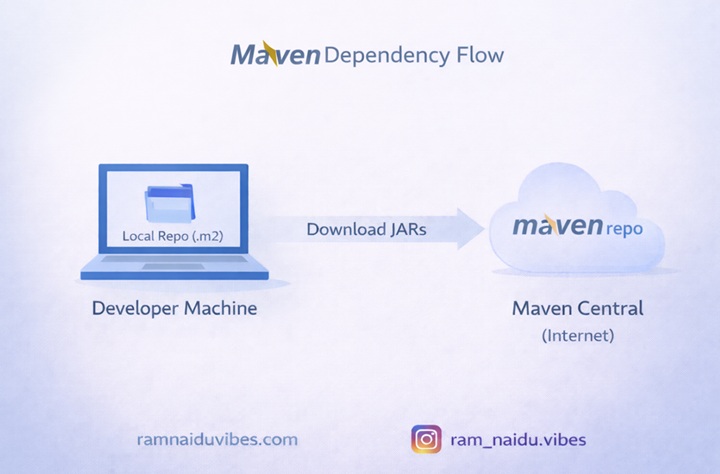
- Local Repository (.m2 folder):
- This is a hidden folder on your laptop.
- Maven checks here first. “Do I already have this JAR?”
- Central Repository (The Internet):
- If the JAR is missing locally, Maven goes to the Maven Central Repository (a giant server on the cloud).
- It downloads the JAR and saves it to your Local Repository for next time.
5. The Maven Build Lifecycle (The Domino Effect)
This is the part freshers struggle with. Maven follows a specific sequence of steps. You cannot “Run” without “Compiling.”
The Sequence:
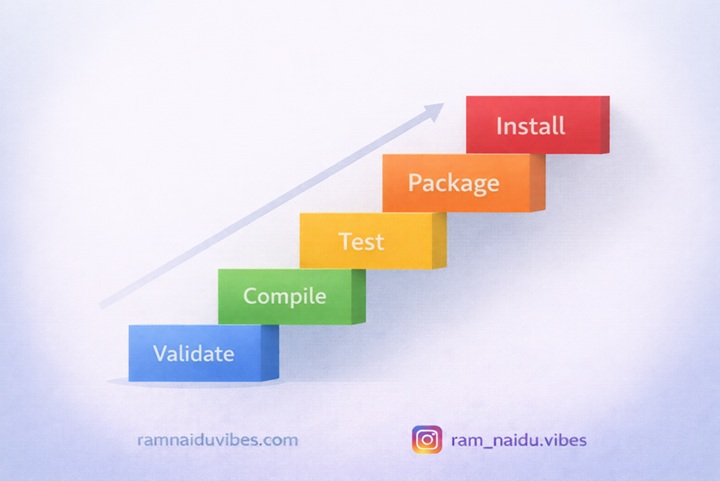
- Validate: Checks if the project is correct.
- Compile: Converts .java code into .class bytecode.
- Test: Runs unit tests (JUnit). If tests fail, the build stops.
- Package: Converts compiled code into a runnable format (JAR or WAR).
- Install: Copies the JAR to your local repository so other projects can use it.
- Deploy: Uploads the final JAR to a remote server (like Nexus) for sharing.
Trainer’s Insight:
“If you run mvn install, Maven automatically runs validate, compile, test, and package before it installs. It works like falling dominoes.”
6. Important Maven Commands
You don’t need to memorize everything. These 3 commands cover 90% of your job.
- mvn clean: Deletes the target folder (removes old build files). Always do this before a fresh build.
- mvn test: just runs the test cases.
- mvn clean install: The “Golden Command”. It cleans the old files, compiles new code, runs tests, and packages everything. Use this command 99% of the time.
7. Conclusion: Maven is a Skill, Not Just a Tool
If you are learning DevOps or Spring Boot, you cannot avoid Maven.
- DevOps Engineers use it in Jenkins pipelines.
- Java Developers use it to manage Spring dependencies.
Next Steps: Open your IDE, create a “Maven Project,” and look at the pom.xml. Try adding a dependency (like MySQL) and watch Maven download it like magic.